June 22, 2026
Building MOTScope: A Lightweight Tool for Inspecting Multi-Object Tracking Datasets
A short note on why I built MOTScope, a lightweight browser-based tool for inspecting MOT-style datasets.
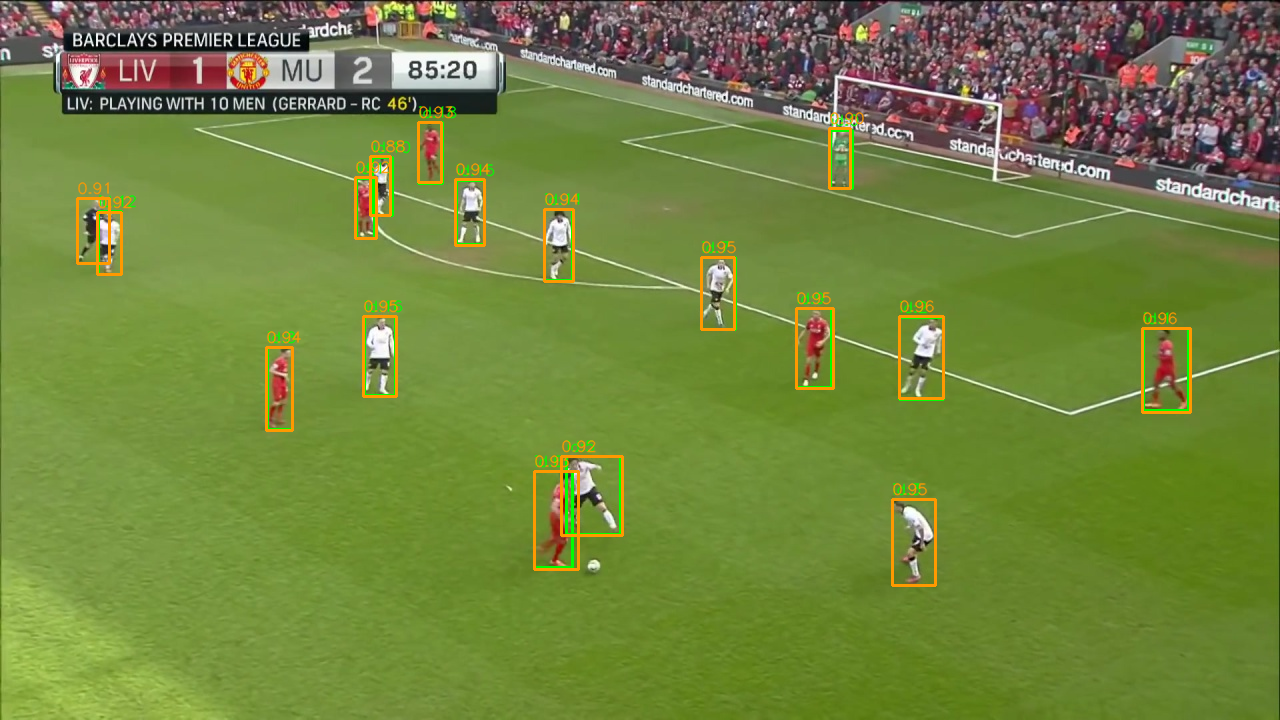
When I work on multi-object tracking, I often need to check a dataset before training, testing, or debugging a tracker. The folder structure may look correct, but small problems can still hide in the annotations, frame order, sequence metadata, bounding boxes, or track IDs.
Those problems are hard to catch from text files alone. A sequence can have the right img1 folder and the right gt.txt file, but the boxes may be shifted, the frame numbers may not match, or an identity may break halfway through the sequence.
That is why I built MOTScope, a small browser-based tool for inspecting multi-object tracking datasets.
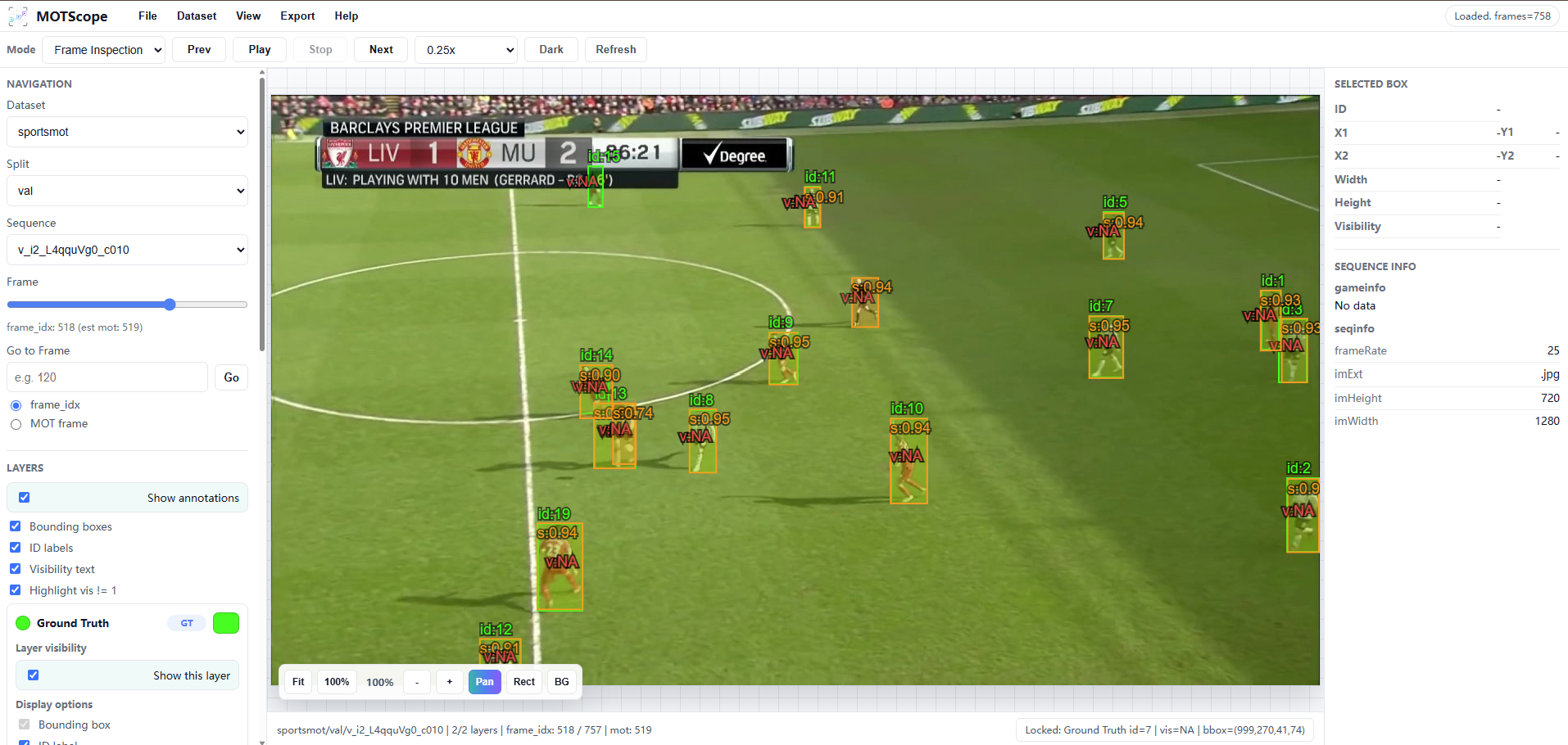
The idea is simple. I wanted a faster way to look at MOT-style datasets without writing a new visualization script every time. MOTScope lets me open a local web interface, browse a sequence frame by frame, and see the annotations directly on top of the image.
Why I built it
In MOT research, the data can cause problems just as easily as the tracker. A bad result is not always caused by the model, the motion prediction, or the association strategy. Sometimes the dataset itself has an issue.
For example, a sequence may have missing frames, wrong annotation paths, mismatched frame indices, shifted boxes, or inconsistent identity labels. These are easy to miss if I only inspect the annotation files manually.
Visual inspection is still one of the quickest ways to check whether a dataset is usable. I use it to answer questions like:
- Are the boxes aligned with the objects?
- Do the track IDs stay consistent across frames?
- Are the annotation frame numbers matched with the image frames?
- Are the ground truth and detection files loaded from the correct paths?
- Did a dataset conversion script produce any obvious mistakes?
MOTScope is meant to make these checks faster and less repetitive.
What MOTScope does
MOTScope is designed for MOT-style datasets. It displays image sequences together with annotations such as bounding boxes, identity labels, confidence scores, detections, and tracker outputs.
The current features include:
- browsing image sequences frame by frame;
- drawing bounding boxes, track IDs, and confidence scores;
- showing multiple annotation layers at the same time, such as ground truth and detections;
- switching between datasets, splits, and sequences in the browser;
- registering new datasets without editing the source code;
- configuring dataset-specific layouts, including split names, image folders, and annotation files;
- using smooth video playback for faster review;
- exporting frames, image sequences, or videos with selected annotations;
- keeping local dataset paths outside the source code.
I mainly built it for my own MOT workflow, but the structure is general enough for other MOT-style datasets. At the moment, it works with datasets such as SoccerNet-Tracking and DanceTrack, and it can be extended to other datasets through configuration.
Dataset configuration
One useful part of MOTScope is that dataset paths and layout settings are not hard-coded into the source code.
This matters because I often move between datasets, machines, and experiments. Instead of changing Python files every time, I can register a dataset through the web interface or define it in a local configuration file.
A typical MOT-style dataset looks like this:
<dataset-root>/
  <split>/
    <sequence>/
      img1/
        000001.jpg
        000002.jpg
        ...
      gt/
        gt.txt
      det/
        det.txt
      seqinfo.ini
      gameinfo.ini
The annotation format follows the MOTChallenge style:
frame,id,x,y,w,h,confidence,class,unused
For visualization, the important fields are the frame index, object ID, box coordinates, and confidence score.
MOTScope can also load several annotation sources as separate layers. For example, I can display ground truth from gt/gt.txt and detections from det/det.txt on the same frame, each with its own color and display settings.
Why a small viewer helps
MOT experiments involve a lot of small checks.
Before running a tracker, I may want to confirm that a dataset conversion worked. After running a tracker, I may want to inspect where an ID switch happened. When tuning detections, I may want to compare detection boxes against ground truth.
Without a viewer, these checks usually turn into small one-off scripts. Load images. Parse text files. Draw boxes. Change paths. Run again.
MOTScope removes some of that friction. I can open the browser, choose a dataset, select a sequence, and inspect the result directly.
This is especially useful for sports videos. Players move quickly, wear similar uniforms, overlap with each other, and appear under changing camera views. Metrics are useful, but sometimes I need to see the sequence to understand what actually happened.
Current status
MOTScope is intentionally small. It is not a full annotation platform, and it is not trying to replace advanced labeling tools. It is a research utility for checking MOT-style datasets, detections, and tracker outputs.
I am currently improving:
- the interface for faster inspection;
- support for datasets such as MOT17, MOT20, SportsMOT, and custom sports datasets;
- smooth playback with canvas-based overlays;
- export options for annotated frames and videos;
- comparison between ground truth, detections, and tracker outputs;
- support for other annotation formats, such as COCO-style tracking.
Repository
The project is available here:
https://github.com/shijunjie07/mot-viewer
I will keep improving MOTScope as part of my research workflow for multi-object tracking, dataset inspection, and sports video analysis.
Contributions
MOTScope is still evolving. Contributions are welcome.
Useful directions include:
- adding dataset presets;
- improving playback controls;
- supporting more annotation formats;
- improving multi-layer comparison;
- adding export options for annotated frames or videos;
- improving documentation and examples;
- refining the interface for large-scale dataset inspection.
For contribution, it is better to open an issue first so the idea can be discussed before implementation.